Ignored By Dinosaurs 🦕

Was asked this question recently, and haven't done any low level string manipulation w PHP in a little while. Couldn't remember the signature of substr(), but that wasn't my method anyway. Mine was more like iterating over an index, working from the back forward and concat-ing that on to a new string. Also, this is like 5 minutes worth of code, so cut me some slack.


echo "\nString reverse test\n";

function bench_it($func) {
  if (function_exists($func)) {
    $str = file_get_contents(__DIR__ . '/mobydick.txt');
    $results = [];
    $iter = 10;
    for ($i = 0; $i < $iter; $i++) {
      $then = microtime(true);
      $func($str);
      $now = microtime(true);
      $results[] = $now - $then;
    }
    $timeout = array_sum($results) / count($results);

    echo "$func avg: $timeout\n";
  }
}

function substr_test($str) {
  $len = strlen($str);
  $new_str = "";
  while ($len  0) {
    $new_str += substr($str, $len, 1);
    $len--;
  }
}

function str_concat($str) {
  $len = strlen($str);
  $new_str = "";
  while ($len > 0) {
    $new_str += $str[$len - 1];
    $len--;
  }
}

function str_push_and_join($str) {
  $len = strlen($str);
  $arr = [];
  while ($len > 0) {
    $arr[] = $str[$len - 1];
    $len--;
  }
  implode('', $arr);
}

function strrev_test($str) {
  strrev($str);
}
bench_it('substr_test');
bench_it('str_concat');
bench_it('str_push_and_join');
bench_it('strrev_test');
grubb:php/ $ php test.php [18:18:13]

String reverse test

substr_test avg: 1.2850220918655
str_concat avg: 0.24263381958008
str_push_and_join avg: 0.63150105476379
strrev_test avg: 0.00075311660766602

So the method that I was working on (#2 str_concat) is the fastest besides the built in strrev(), but most interesting is when you run these same tests on PHP 7.0.4 —

grubb:php/ $ brew unlink php56 && brew link php70 [18:18:56]
  Unlinking /usr/local/Cellar/php56/5.6.19... 19 symlinks removed
  Linking /usr/local/Cellar/php70/7.0.4... 17 symlinks created
grubb:php/ $ php test.php [18:19:20]

String reverse test

substr_test avg: 0.12836751937866
str_concat avg: 0.084317827224731
str_push_and_join avg: 0.13263397216797
strrev_test avg: 0.00083370208740234

#php

It's an interesting time to be building things for the web. It's matured to a place where much of our day to day lives is conducted through sites that we access online. I personally buy books on paper, diapers, any piece to repair a broken appliance. I search for clues on how to do my job. I read up on the latest state of th technology scene. Every one of these places I go has largely the same stuff on it – some kind of login, some kind of way to get to “my stuff”, some kind of way to make sure that others can't get to my stuff.

Building this stuff is not exactly easy, and to do it in a way that makes it a lot harder for other people to break (or break into) is downright terrifying. So what do we do? We team up. How do we do it? Well, in this day and age it's called “open source software”.

Drupal is just such a piece of software. Right out of the box it comes with all that standard stuff – user accounts, a mechanism for posting stuff online – either publicly or privately, and mechanisms for doing many of the other things that you could think of. Lots of folks use Drupal and have been using Drupal for many years now, which means that for the vast majority of things that you want your site to do someone else has wanted their site to do that too. Even better, they've already solved the problem and given the solution back to us all, so you don't have to go solve it again. This is the essence of open source – folks all over the world working together, and a huge part of why I use Drupal.

What about Tool X?

To be sure, Tool X is excellent. It has a great user community and many of these same problems have been solved in a different way inside it, but it actually requires you to write code, which Drupal doesn't require for you to get started.

Tool W is another project much like Drupal, but it isn't nearly as flexible as Drupal, it stays within a smaller set of lines. It does what it does within those lines excellently, so definitely evaluate if you can solve your case with Tool W before coming to Drupal, as Drupal is a bigger piece of machinery with a steeper learning curve.

Who uses Drupal?

Lots of folks. Right now the best use case for Drupal is for sites that have a lot of content. These include publishers and their sites, government agencies and their sites, and educational insitutions and their sites. Lots of times these folks have specific needs for how they present their content to the world and how they allow the world to access it, and Drupal fits that use case like a glove.

Turns out that most things that go on the web aren't that far away from this specific use case, so extending Drupal to get there is often a pretty straightforward and well trodden path. This series hopes to make it even more straightforward for newcomers.

Why not Drupal?

Drupal is not good at everything, however. Don't use it to ingest real time trade data from the NYSE, for example. You'll want a leaner and more purpose built system for that, but chances are if you're building something like that you already know this.

Now, on to installing Drupal.

#drupal

Hi there, I'm new to Django. I love the contributed ecosystem, but all of the options that I found there for dealing with Markdown were just too heavy. I didn't need a Wysiwyg editor, I just wanted an output filter. As it turns out this is exceptionally easy to do!


Python has a really amazing lib situation, so I just found the smallest python Markdown lib that I could, it's called “mistune”. Do a pip install mistune.

So within your app, let's call it “blog”, create a directory called templatetags. By the way, this is all pretty easy to parse out of their killer documentation. Create a file in there called markdownify.py.

 # blog/templatetags/markdownify.py
from django import template
import mistune
 
register = template.library()
 
@register.filter
def markdown(value):
	markdown = mistune.Markdown()
	return markdown(value)

It is as simple as that. In whatever template you'll actually want to be rendering markdown, you'll need to include this templatetag with

 {% load markdownify %}

at the top of the template. Then you'll just pipe the output that you want to render like you do in every other template lib —-

{{ post.body | markdown | safe }}

The full example of the template that renders this page is here.


But wait, there's more!

How about syntax highlighting? We're programmers after all, and Python just happens to have the great-granddaddy of all syntax highlighting libs in Pygments. I've known of Pygments for years, since it used to be a requirement of one of the Ruby libs to Markdown rendering (if you wanted synta highlighting). In other words, even Ruby leaned on Pygments for a great number of years.

So pip install pygments. Then scroll down the page on the Mistune docs and follow along. You'll be adding some code to the markdownify.py file.

from django import template
import mistune
from pygments import highlight
from pygments.lexers import get_lexer_by_name
from pygments.formatters import HtmlFormatter

register = template.Library()

class HighlightRenderer(mistune.Renderer):
    def block_code(self, code, lang):
        if not lang:
            return f"""
```
{mistune.escape(code)}
```
            """
        lexer = get_lexer_by_name(lang, stripall=True)
        formatter = HtmlFormatter()
        return highlight(code, lexer, formatter)

@register.filter
def markdown(value):
    renderer = HighlightRenderer()
    markdown = mistune.Markdown(renderer=renderer)
    return markdown(value)

That HighlightRenderer class is directly out of the Mistune docs, so thank you Mistune Author! That is seriously all it takes, but you'll need a stylesheet, of which there are plenty. I searched for “pygments stylesheets” and came across this project, so you'll need to pick one of those themes and get it into your project somewhere. By default, the zenburn theme is expecting the wrapper div to have a CSS class of 'codehilite' instead of what it needs – 'highlight', so a quick search and replace and I had syntax highlighting in less than 5 minutes.


*edit Sept 2016*

So once you manage your way through all this, you'll be able to use “fenced code blocks” in your posts. They look like this —

```php
<?php 

function foo() {
 /// ...
}
```

becomes

<?php 

function foo() {
 /// ...
}

You can use either a trio of tildes ~ or backticks ` to open and close one of those code blocks, and I typically just pass the file extension and it generally works. You can also write out the full name of the language.

```py
def method():
    return "foo"
```

becomes

def method():
    return "foo"

Just be advised that it is possible to fatally hose your website if you happen to pass a language for which Pygments doesn't have a “lexer”, meaning that it has no idea how to highlight the syntax of that language. That happened to me with some Varnish config files that I tried to highlight with a .vcl extension on them. I don't remember how I fixed it but I'm pretty sure it required going directly to the database to change the post since my site was toast. You are warned.

#python #django

I started working with Django last week. The documentation is complete, organized, and located in one indexed portion of the website. You can download a PDF of the entire thing and it's better than any O'Reilly book you could possibly buy about Django. If you land on a page for an old version of the framework, it lets you know.

The same thing goes for Postgres.

The same thing goes for Symfony.

The same thing goes for Rails.

The same thing goes for React.

These are tools that want to be used. It's obvious from the onboarding tutorials in each of these that they want to make the process easy for noobs.

Contrast this with Drupal. I had been poking at and trying to figure out Drupal for almost a year (getting actual work done with Wordpress in the meantime) before I picked up a book that finally cleared it up for me. Oh! Drupal isn't supposed to do anything! You have to go module shopping to make it do simple things! And you have to go buy a book to tell you that!

And the situation has only gotten worse now that Acquia has decided to throw away over a decade of community knowledge about how to build Drupal sites. Where's the simple onboarding tutorial in here (?), because i can't find it.


I'm not saying that Drupal 8 is going to fail – god knows it is a ginormous step forward in SO many ways – but if it does it'll be because the Drupal project takes building things far more seriously than it does anything else, especially teaching others how to use those things. The smartest thing that Acquia could do at this point for the future of Drupal would be to put a complete moratorium on any new features until the currently existing features are covered with this level of official documentation.

#drupal

So before the pitchforks come out, this is where this blog post came from.

I need someone to submit “Why is drupal uncool?” to https://t.co/WkZUojaBkS #DrupalCon

— Cathy YesCT (@YesCT) February 22, 2016

YesCT started riffing on great ideas for DrupalCon session. Alas I didn't submit any of them, I submitted my session about how Paragraphs module got my mojo back. It was not accepted, which is kind of a relief.

Anyway, I have a few ideas on this topic. Let's see what falls out.


It's PHP

So yes, PHP. AFAIK in all of it's 20+ year history PHP has never ever been the Hot New Thing. It has things to recommend it, namely the deployment story which enables folks to get started building things immediately and not have to worry about setting up anything on a server. If there were any other option that were this simple, PHP probably would not be the thing that it is today, but for that horse a kingdom has been built.

Just Google “why PHP sucks” for more on this topic. In a nutshell it's maddeningly inconsistent. I've been working with Python for all of 4 weeks and I already know it better than I know PHP in 8 years of working with it. “The API is consistent”, which is a fancy way of saying that you don't have to look up the order of the arguments for a function every single time you want to use that function. Quick, array_push() – is it haystack/needle or needle/haystack?

Drupal suffers from this spillover, as do basically all PHP frameworks. Until D8, Drupal didn't even have the benefit of object orientation (by benefit I mean, it makes it cooler).

It (historically) tries way too hard

Remember this – http://certifiedtorock.com/? Sadly, this is still a thing on the internet.

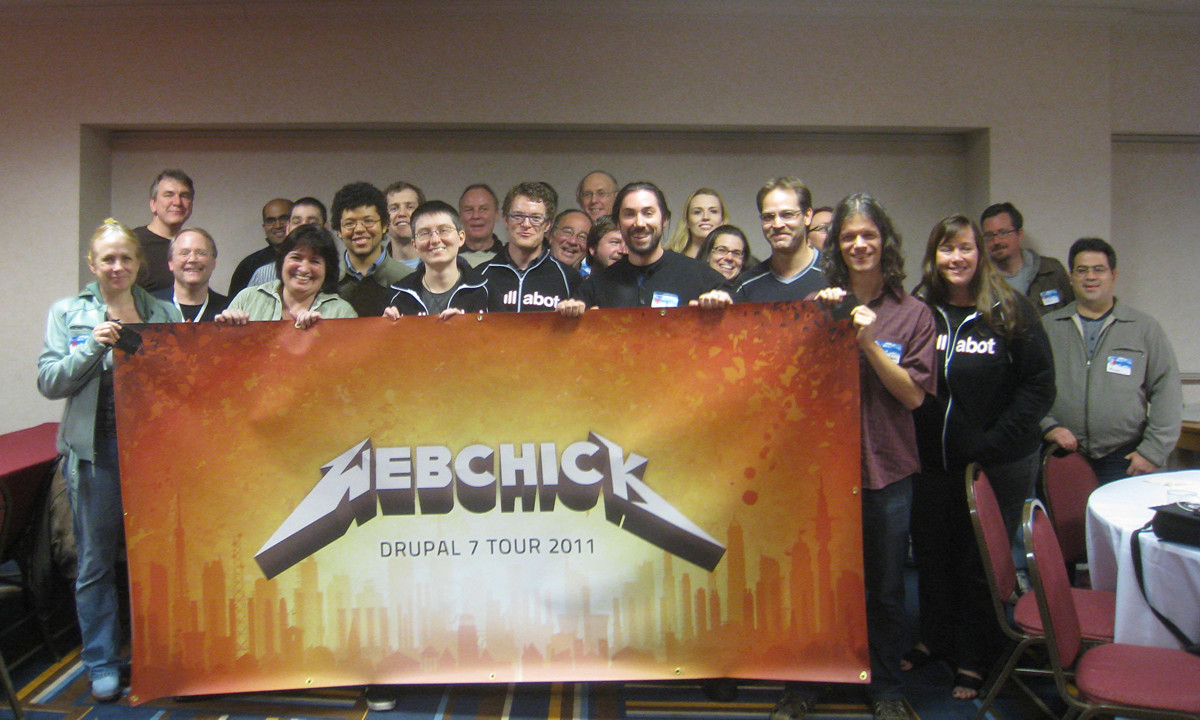
Or what about this one?

webchick world tour

I'm super, duper sorry for dredging this up, because I have nothing but respect for Webchick. Seems like everything she writes is so dead on and the respect that she has in the community probably surpasses what even Dries gets. But I'm not sure who thought this was a good idea.

In this regard, Drupal is like me at 15 or so. I was not cool, but I went and bought Doc Martins anyway because the cool kids wore em. I think both of these are around the same era – the time that Rails was absolutely the White Hottest New Thing and everyone else was trying to keep up.

The documentation sucks

And this is the real point here. I started working with Django last week. The documentation is complete, organized, and located in one indexed portion of the website. You can download a PDF of the entire thing and it's better than any O'Reilly book you could possibly buy about Django. If you land on a page for an old version of the framework, it lets you know.

The same thing goes for Postgres.

The same thing goes for Symfony.

The same thing goes for Rails.

The same thing goes for React.

These are open source projects that want to be used. They put forth as much effort into the documentation for the things they've built as they put into the things themselves. It's impossible as a Drupal dev to see documentation like this and not feel like “wow, this is a toolkit that takes itself seriously and respects folks who want to use it”. It's impossible as a Drupal dev to see documentation like this and not feel like “WTF is Acquia doing?”

Drupal 8 will not succeed until it has documentation like this. I have contributed to the Drupal 8 User Guide, but good luck finding it. You can find the project page, but the actual documentation is nowhere on the front page results of that search.

[Rather large rant about the JS framework in core discussion redacted.]

#drupal

So here it is. The last version of this blog – a Rails frontend to a Postgres backend – actually stood for almost 2 and a half years. I think that's probably a record.

In keeping with my decided new theme for this blog however, I've decided to rewrite the thing in Django. Not that you can't google it yourself, but Django is (at a high level) basically the Python version of Rails. Actually, it's basically the Python version of every MVC web framework. It's been around for 10 years, so it is far from the hot-new-thing. I've finally been doing this for long enough that I shy away from the hot-new-thing and actively seek out boring, tested solutions to problems.

At work we've begun a small project that we were targeting to build on Drupal 8. Faced with the timeframe, the relative lack of basic modules for building Drupal 8 sites, and the learning curve for the code that we'd inevitably have to write on our own I pitched the idea to my team to try something completely different. I prefaced it with “this is a terrible idea, so raise your hand at any point”, but surprisingly they were all amenable. We all spent a day going through the amazing tutorial and the amazing documentation and they were still on board. So I decided to rebuild this blog to take the training wheels off and give us all some reference code for some of the simple features that weren't walked through in the tutorial – taxonomy, sitemaps, extending templates, etc.

Amazingly it took me all of 4 hours to rebuild the whole thing and migrate the data from one PG schema into the one that Django wants to use. Django is even easier to use than Rails – a fact that blew my mind once I started playing with it.

The deployment story however, is a shit show. I spent as many days trying to get this thing up on a Digital Ocean server as I spent hours building the application in the first place. I'm hoping to find that there is an easier, more modern means for serving Python apps in 2016 after some more digging.

Anyway, thanks for stopping by!

#generaldevelopment #python #django

My brother in law is a recruiter. He historically recruits salesfolks for companies “in the BI space”. I tried to help him out many years ago when I was still on the road playing music, but had absolutely no background to do anything other than plow through the spreadsheet of contacts that he had and try and get a response. Like most witless recruiters. I had no idea what BI was.

Years later, after starting a new job at ABM I still had no idea what BI was. It was something we needed, or something we did, I wasn't really sure. We had a big old database, some stuff was in there, reports came out. Somebody read them. No idea. Didn't seem very intelligent, but apparently it helped with our business, yet most of the time people seemed pissed off at it and the person who ran it.

So here's a quicky definition of “Business Intelligence” for me, 5 years ago.


Companies take in a lot of data. Data can be anything. It can be logs from your webserver. It can be daily dumps from Google Analytics about the traffic on your site. It can be daily dumps from Exact Target or Mailchimp about what emails went out yesterday, on what lists, and which ones were opened, which ones bounced. What videos were played on the sites yesterday? On what kind of browser? Basically it's anything and everything that a business can get their hands on.

Ok, you've got your hands on it, now what? Let's figure out how to figure out what is going on with our business on a macro scale so that the C suite can make decisions and we can all keep our jobs.

This is basically what BI is. Take in data. Munge data. Get answers out of data so that you can run your business.

Obviously today (2016), this is big business. “Big data”, you've heard of that? Very closely related to BI, since the amount of data that we are able to take in these days is so vast that there's no way we could get meaningful answers out of all of it using technology from even just 10 years ago.

Wrangling all this data is a wide open field, and that's where I want to be right now.

#business #data

Yeah, the pricing on the new AWS ES service is too high for you too, huh? Well just using their service is a heck of a lot easier and possibly cheaper in dev time than trying to set it up yourself. Consider that. But possibly together we can make it over the hump.

These are the bits that I was stuck on.


Put all your nodes in the same security group

I have a group for all my EC2 instances that has the appropriate ports opened up.

#devops #elasticsearch

This one really took longer than it needed to.

If you're here, hopefully you've already been through this lesson on setting up the full ELK stack with Logtash-Forwarder thrown in to boot. For me it pretty much ran as intended from top to bottom, so hopefully you're already getting data into Elasticsearch and are flummoxed by how every single other logstash config out there to parse your syslog data doesn't seem to do the job and is still just treating it like every other syslog message.

The rest of the steps to configure Drupal/Logstash

Drupal's “syslog facility” setting

This is more or less the key. You have to dig around in Drupal, as well as your webserver and make sure that Drupal is logging to it's own log. By default it'll just go to syslog and then you'll have a hell of a time distinguishing messages from Drupal on the way in.

If you recall your Logstash-Forwarder config, you tagged the syslog watcher with a "type": "syslog" bit. This is really the only info that logstash has at the point that you're setting up your input filters/grok config.

Regardless of Linux flavor, follow this guide to set up the syslog module to point to a logfile of your choosing – https://www.drupal.org/documentation/modules/syslog. I just copied everything in here, so I now have /var/log/drupal.log and it works just fine. The only thing I haven't figured out yet is that now Drupal is logging to both syslog and drupal.log, so somebody tell me how to stop that from happening.

New Logstash-forwarder config

You'll just need to a) remove the old syslog watcher from your Logstash-Forwarder (henceforth LF) config and b) tell it to now watch the new drupal.log instead. This took the relevant bits of my LF config from this

 {
 "paths": [
 "/var/log/syslog",
 "/var/log/auth.log"
 ],
 "fields": { "type": "syslog" }
 }

to this

 {
 "paths": [
 "/var/log/drupal.log"
 ],
 "fields": { "type": "drupal" }
 }

Don't restart LF just yet, we have to config Logstash to understand what to do with input of “type: drupal” first.

New Logstash config

This is where I wasted most of my time over the last few days. I was under the mistaken impression that I could perform some kind of introspection into the fields that were parsed out and then tell Logstash to do this or that with them. As far as I can tell, you'd need to use the “Ruby” Logstash filter to do that, which I didn't feel like this was that complicated a use-case if I could just figure out the “right” way to do it.

Anyway, you've probably already stumbled across this – https://gist.github.com/Synchro/5917252, and this https://www.drupal.org/node/1761974 both of which, annoyingly, show the same useless config (for me, anyway).

My logs look like this —

Oct 4 08:52:34 690elwb07 drupal: http://www.biosciencetechnology.com|1443963154|php|162.220.4.130|http://www.biosciencetechnology.com/news/2011/04/students-prediction-points-way-hot-dense-super-earth||0||Notice: Trying to get property of non-object in abm_metadata_page_alter() (line 41 of /var/www/cascade/prod/brandsites_multi.com/htdocs/docroot/sites/all/modules/custom/abm_metadata/abm_metadata.module).

The config on that page is presumably looking for a string that begins with “http”, which this clearly does not. Here's the config for this particular sequence.

filter {
 if [type] == "drupal" {
 date {
 match => [ "timestamp", "MMM d HH:mm:ss", "MMM dd HH:mm:ss" ]
 }
 grok {
 match => [ "message", "%{SYSLOGTIMESTAMP:syslog_timestamp} %{SYSLOGHOST:syslog_hostname} %{DATA:syslog_program}(?:\[%{POSINT:syslog_pid}\])?: https?://%{HOSTNAME:drupal_vhost}?\|%{NUMBER:drupal_timestamp}\|(?[^\|]\*)\|%{IP:drupal_ip}\|(?[^\|]\*)\|(?[^\|]\*)\|(?[^\|]\*)\|(?[^\|]\*)\|(?.\*)" ]
 }
 }
}

Now restart Logstash, restart LF, and carry on.

#devops #drupal

So this is just another letter to my younger self, straightening out some mental inconsistencies with how I used to think Memcached worked. Much of this will be in the context of Drupal, since much of my work experience is in the context of Drupal. Memcached is obviously not a Drupal specific construct though.

Expository

The first time I ever installed it was at the behest of my senior dev, who suggested just installing it on my laptop and giving it 64M of memory. Drupal is slow as molasses if you don't enable caching, so out of the box it actually comes with a pretty intelligent caching story. By default however, it caches everything into the database. This is “less than ideal” for sure, but since Drupal came up a long time ago in the shared hosting days, and since you could never really know what resources were going to be on the server in the first place it made sense to use what you knew would be there – namely MySQL.

This is not ideal since you're still hitting the database – often the bottleneck with Drupal – but it lightens the load significantly from the default and will definitely keep your site up under load, to a point.

One of the first places you start looking for performance improvements is in moving that out to something a little more responsive and purpose built. Redis is a newer option, but the old reliable standby is Memcached. Drupal has a bunch of tables in the database that start with cache_, and (simplified) they basically all have the format of (cache key)/(value). Love those out into Memcached and rather than hitting the DB, you're hitting memory. This is ideal, since looking something up in RAM is orders of magnitude faster than calling the DB.

This is why big boy sites use Memcached.

Beginning explorations

A bug appeared months ago on our websites. An editor would make a change to a piece of content, say bold an word, and upon saving the piece of content, they would frequently see the old version of the article and not see the change they just made. Obviously this is really annoying, because then they have to go and redo the change they just made, which then would usually work.

This got really interesting when I discovered that clearing the cache on the site would then make the change appear. Clearly this was an issue in the cache layer somewhere.

We used to use a big name hosting vendor who built the servers for us, and Memcached was installed on every webserver and given 512M to work with. I knew that the load balancer would route authenticated traffic to the same webserver, so this lead to my mistaken notion that each webserver had it's own instance of Memcached to work with and that if the editor would hit a different one on saving the page, perhaps they were getting an old version of the article.

This is not how Memcached works, as it turns out.

Go to Memcached.org

So the introductory page of http://memcached.org/ says

Free & open source, high-performance, distributed memory object caching system

What that means for me is that my mental model of each webserver having it's own pool and being unaware of the others was incorrect. What really happens is that each server you add to the pool adds to the overall cache size, and objects are distributed among them only once. I thought we had 4 512M instances of Memcached, but we really had 1 2G pool.

The wiki has some interesting notes on the the design paradigms that are worth quoting.

The server does not care what your data looks like. Items are made up of a key, an expiration time, optional flags, and raw data.

Funny, so basically the exact same schema as the cache tables in the Drupal database. That's handy.

Memcached servers are generally unaware of each other. There is no crosstalk, no syncronization, no broadcasting. The lack of interconnections means adding more servers will usually add more capacity as you expect.

For everything it can, memcached commands are O(1).

So this means that means that it should basically scale infinitely with the same performance. Whether you have 32M on your laptop, or 48G across 6 servers as we have now in production, the lookup time is constant for a piece of cached data.

What about the problem?

I actually just solved it yesterday. It was this – https://www.drupal.org/node/1679344. Learned a hell of a lot about caching in Drupal and caching in general in the last 6 months before really hunkering down to figure this one out.

#devops